
CSS Variables: The Superpowers of Native CSS Variables
In this article (and video) I'll show you a bit of the powerful native CSS variables (aka Custom Properties) ❤️, which might be one of the most underused things in CSS (unfortunately).

On this post
This post is a text version of the video “CSS Variables: The Superpowers of Native CSS Variables” that I published on my YouTube channel (in Portuguese).
It’s worth watching! 😊
The evolution of CSS in recent years
In recent years we’ve had a series of important improvements in CSS, like CSS Grid and Flexbox and CSS Variables, which in my view are mysteriously among the most underused things in CSS.
The reason might be that variables have been around for years and years in CSS preprocessors and even in CSS-in-JS solutions.
So I notice that people end up using those variables and aren’t that interested in using native CSS variables. Another reason might be the syntax itself, which is a bit verbose and puts some people off (I’ve heard a lot of people say that haha 😂).
Motivations aside, this is a super powerful feature and extremely useful for our day to day.
Preprocessor variables
Preprocessor variables (like Sass, Stylus or even CSS-in-JS) are static, meaning they get converted into fixed values right after the build.
For example, the following code (in SCSS):
$gray: #555;
$gray-dark: #333;
$gray-darker: #111;
$gray-light: #f1f1f1;
$gray-lighter: #fafafa;
$blue: #187888;
$yellow: #e6af05;
$white: #fff;
$black: #000;

body {
  background-color: $white;
  color: $gray-darker;
}

.header {
  background-color: $gray-light;
  color: $gray-darker;
}
Will be compiled into this CSS:
body {
  background-color: #fff;
  color: #111;
}

.header {
  background-color: #f1f1f1;
  color: #111;
}
If we want, for example, to change the theme after clicking a button, we’ll need
strategies like adding a class to the body to override the initial value.
$gray-dark: #333;
$gray-darker: #111;
$gray-light: #f1f1f1;
$gray-lighter: #fafafa;
$white: #fff;
$black: #000;

body {
  background-color: $white;
  color: $blue;

  &.theme-dark {
    background-color: $black;
    color: $gray-lighter;
  }
}

header {
  background-color: $gray-light;
  color: $gray-darker;

  .theme-dark & {
    background-color: $gray-darker;
    color: $gray-lighter;
  }
}
Which will generate this CSS:
body {
  background-color: #ffffff;
  color: #187888;
}

body.theme-dark {
  background-color: #000000;
  color: #fafafa;
}

.header {
  background-color: #f1f1f1;
  color: #111;
}

.theme-dark .header {
  background-color: #111111;
  color: #fafafa;
}
In other words, we’d need to change the colors of every element whose values
have to be replaced when the body has the theme-dark class, which can end up
being hard to map and to scale.
Another point is that these variables are tied to the syntax of the technology they were created in, so sharing variables created in Sass with native CSS or with CSS-in-JS is only possible using plugins.
CSS Variables (aka Custom Properties)
Native CSS variables, on the other hand, are always dynamic, meaning they stay available as variables whenever we need to access their values.
Check out this plain CSS code.
:root {
  --gray-dark: #333;
  --gray-darker: #111;
  --gray-light: #f1f1f1;
  --gray-lighter: #fafafa;
  --white: #fff;
  --black: #000;
}

body {
  background-color: var(--white);
  color: var(--gray-darker);
}
The code above is always going to be the same code, because CSS Variables don’t depend on any extra technology to work (like preprocessors or CSS-in-JS) and they aren’t compiled either.
They’re simply interpreted by the browser!
Native variables respect the CSS cascade
The :root pseudo-class represents the <html> element and is identical to the
html selector, except that its specificity is higher. The reason almost every
usage of these variables is attached to :root is precisely that it has the
highest specificity among the elements accessible in CSS.
You can read more about this pseudo-class in the MDN documentation.
That said, a big advantage of CSS Variables is that they’re available (and can be changed) using the CSS cascade.
That means we can change the value of a variable like in this example:
:root {
  --gray: #555;
}

body {
  --gray: #111;
  color: var(--gray); //#111
}
And that opens up a whole bunch of really cool possibilities 😁
Creating themes easily
Knowing that native CSS variables are dynamic and respect the CSS cascade itself, we can use a different strategy to create themes.
Thinking about the example below (the same one we used in the theme switching example with preprocessor variables):
$gray-dark: #333;
$gray-darker: #111;
$gray-light: #f1f1f1;
$gray-lighter: #fafafa;
$white: #fff;
$black: #000;

body {
  background-color: $white;
  color: $blue;

  &.theme-dark {
    background-color: $black;
    color: $gray-lighter;
  }
}

header {
  background-color: $gray-light;
  color: $gray-darker;

  .theme-dark & {
    background-color: $gray-darker;
    color: $gray-lighter;
  }
}
We can get the same result using CSS Variables:
:root {
  --gray-dark: #333;
  --gray-darker: #111;
  --gray-light: #f1f1f1;
  --gray-lighter: #fafafa;
  --white: #fff;
  --black: #000;

  --background: var(--white);
  --background-header: var(--gray-light);
  --text-color: var(--gray-darker);
}

body {
  background-color: var(--background);
  color: var(--text-color);

  &.theme-dark {
    --background: var(--black);
    --background-header: var(--gray-darker);
    --text-color: var(--gray-lighter);
  }
}

.header {
  background-color: var(--background-header);
  color: var(--text-color);
}
When we use native variables we no longer need to override the values on every
element. We can simply take advantage of the CSS cascade to override the value
of the variables inside the .theme-dark class.
That way we use way less code and get much more scalability inside the application.
Awesome, right? 😍
Manipulable with JavaScript
Since CSS Variables are dynamic, we have another interesting possibility:
Manipulating the values with JavaScript
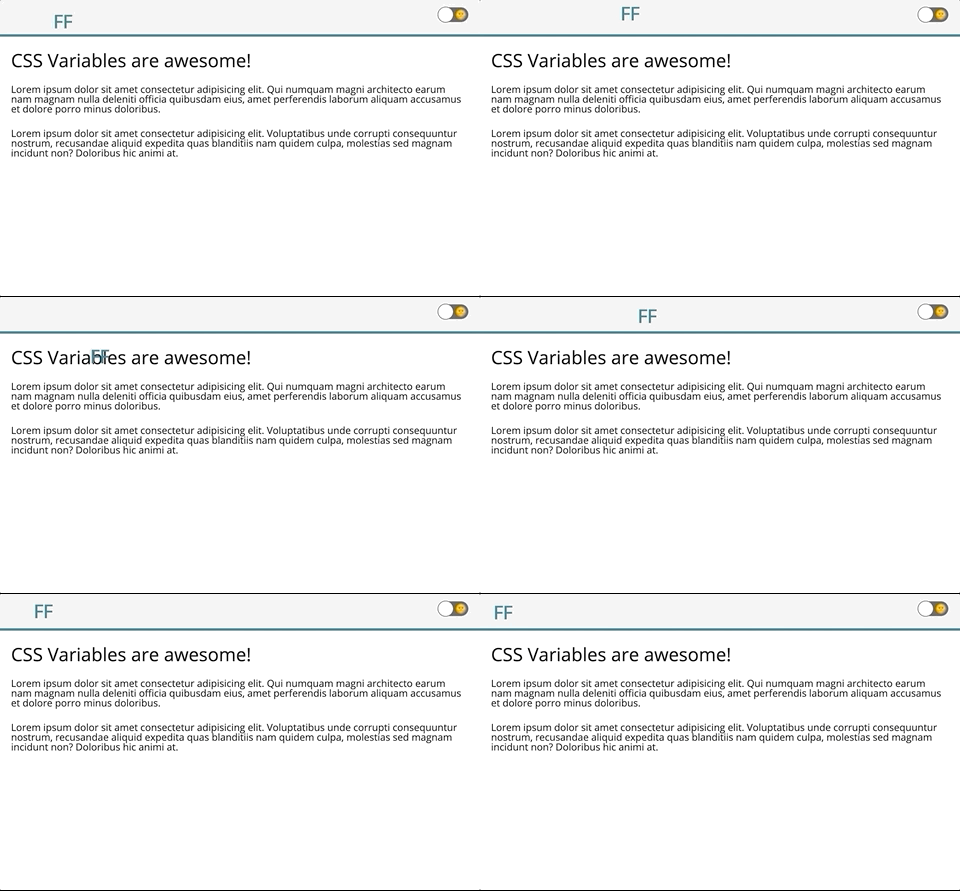
We can, for example, change the position of an item on the screen according to the cursor position, just by changing the values of the CSS Variables.
:root {
  --move-x: var(0);
  --move-y: var(0);
}

.logo {
  left: var(--move-x);
  position: fixed;
  top: var(--move-y);
}
Then all you have to do is change the values of the variables in JavaScript according to the cursor position:
const $body = document.body

document.addEventListener('mousemove', e => {
  $body.style.setProperty('--move-x', `${e.clientX}px`)
  $body.style.setProperty('--move-y', `${e.clientY}px`)
})
This is totally awesome 🤯
I recommend watching the part of the video where I demo the JavaScript manipulation and you can also try it out in the example I left on Codepen:
They’re agnostic about the CSS stack you use
Another advantage of CSS Variables is that they’re agnostic regarding the CSS technologies used in the project.
I had to make use of this in Venice, the Design System at Juntos Somos Mais (in Portuguese).
We needed things like colors, spacing and typography to be shared across all the company’s projects. But the projects use a variety of CSS stacks, like Styled Components, Stylus and Sass, and the only technology common to all of them is CSS itself.
So native CSS variables solved that for us: all we had to do was import the Venice lib into the projects and the variables were already available.
Besides being dynamic and easy to use, they work in any scenario.
Downsides: Media Queries
I’m not sure it’s exactly a downside, but it’s definitely a limitation: unfortunately we can’t use CSS Variables as values in media queries.
That means this doesn’t work:
:root {
  --screen-sm: 768px;
}

body {
  @media (min-width: var(--screen-sm)) {
    ...
  }
}
In that case we still need to use preprocessor variables for it to work as expected.
On the other hand, we can change the value of variables inside media queries, taking advantage of the cascade I showed earlier.
body {
  @media (min-width: 768px) {
    --background: var(--black);
    --text-color: var(--white);
  }
}
Support
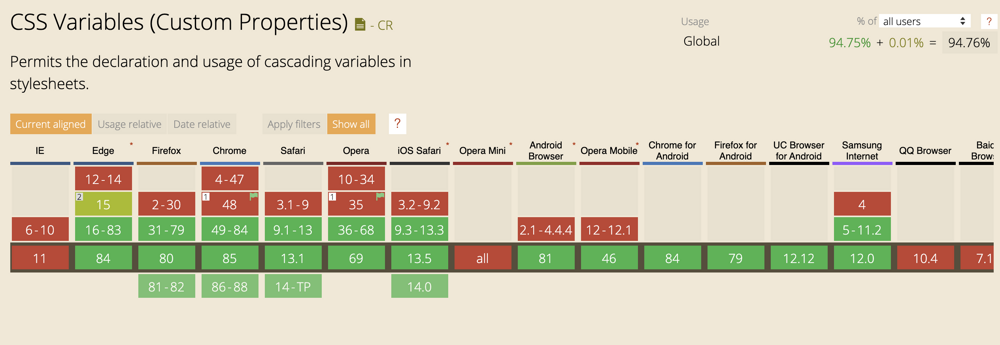
As you can see, CSS Variables have full support in all modern browsers.
And there are a bunch of plugins (some that run on PostCSS), like css-vars-ponyfill, that basically turn CSS Variables into static values, giving support to older browsers.
Conclusion
CSS Variables are still among the most undervalued things in the so-called CSS Level 4, but they’re very powerful and can help a lot in your day to day.
- MDN Using CSS custom properties (variables)
- Can I Use CSS Variables (Custom Properties)
- Everything you need to know about CSS Variables
I hope you liked the post (and the video) ❤️